Workshop · Fri 9 Oct 2026 · 15:30–16:35 · Omar Elcircevi
Architecting Multi-Agent Systems with Google ADK
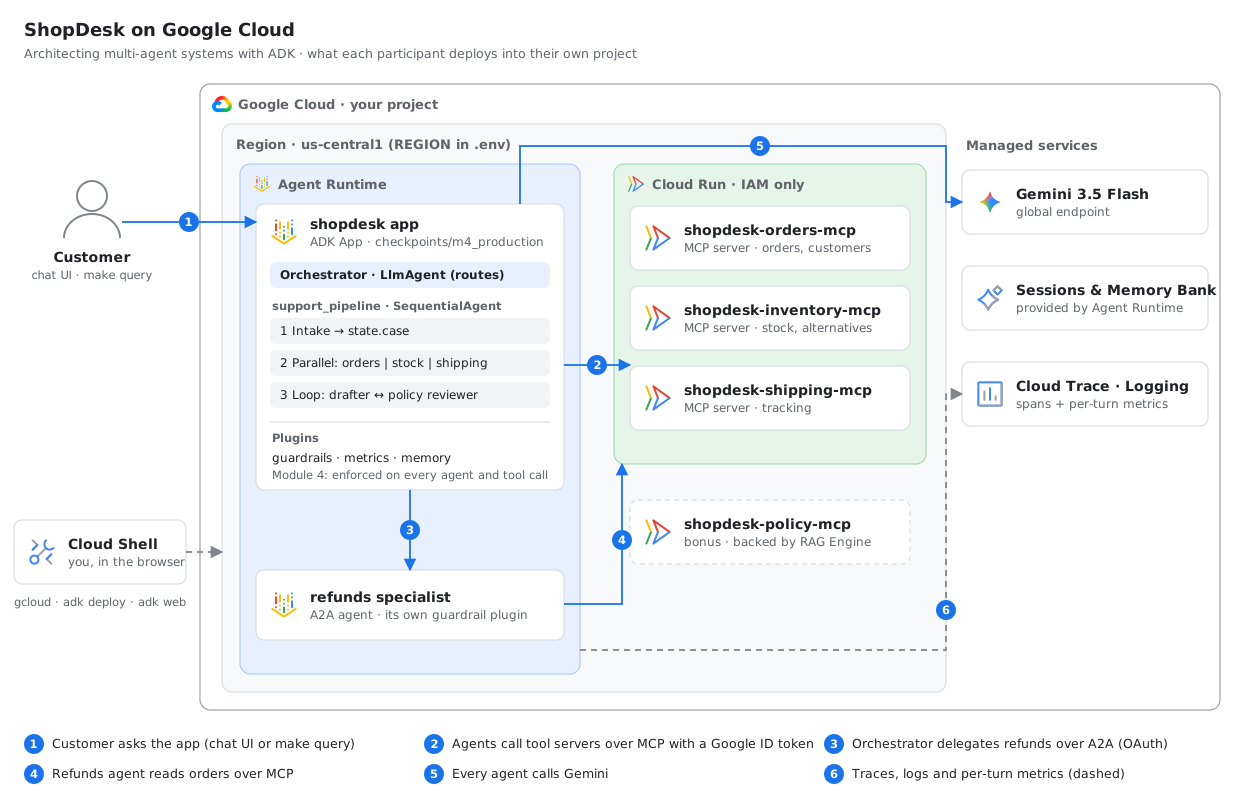
In 65 minutes you build and deploy ShopDesk, a customer-support system for a fictional online store: MCP tool servers on Cloud Run, an orchestrator and an A2A specialist on Agent Runtime, guarded by plugins and measured end to end.
How this works
Everything happens in Cloud Shell on your own Google Cloud project: you read code in the Cloud Shell editor, type the real adk and gcloud commands, and test agents in the ADK dev UI through Web Preview. Anything with more than one moving part is deployed to Google Cloud.
You use two terminal tabs with fixed jobs: tab 1 runs adk web (and later the chat UI), tab 2 runs deploys, which take a few minutes each. Small helpers like make doctor and make query fill the gaps.
Each module has the same shape: a file to open, something to run or deploy, a prompt to try, and what you should see. If you fall behind, jump to the next module's checkpoint folder; each one works on its own.
Agenda
- 15:300 · Opening and setup
- 15:381 · Decoupled MCP tool serversdeploy: 3× Cloud Run
- 15:482 · Workflow patterns: Sequential, Parallel, Loopdeploy: refunds agent (background)
- 16:003 · Orchestrator and A2A discoverydeploy: full app (background)
- 16:104 · Plugins, state and memory, plus the guardrail challenge
- 16:185 · The deployed system on Agent Runtime
- 16:256 · Telemetry: latency, delegation, tokens
- 16:32Wrap-up and cleanup
0 · Setup
Get the repo into Cloud Shell, point it at your project, and check that everything is ready.
You need
- A Google Cloud project with billing enabled
- A browser. Nothing gets installed on your laptop.
Run
Click Open in Cloud Shell above, or open Cloud Shell yourself and clone the repo. Then:
# skip the clone if you used the Open in Cloud Shell button
git clone https://github.com/omarcevi/adk-multi-agent-workshop
cd adk-multi-agent-workshop

gcloud config set project YOUR_PROJECT_ID
make setup      # packages, APIs, permissions (~2 min)
source env.sh   # loads .env into your shell, puts adk on PATH
make doctor     # checks everything, prints the fix for anything wrong
Open your second tab
Click + in the Cloud Shell terminal bar, then:
cd adk-multi-agent-workshop
source env.sh   # once in every tab you use
What you should see
make doctor ends with All good. Deployments show as "not deployed yet", which is expected.
Deploys go to REGION in .env (default us-central1). Change it now if you want another region, not after deploying.
Stuck?
gcloud config set project YOUR_PROJECT_ID, then make setup again.make setup again; it's safe to repeat.1 · Decoupled MCP tool servers
Tools are services with owners, not functions pasted into a prompt.
Open in the editor
7server = MCPServer(8 name="orders",9 instructions="Read-only access to customer orders. Never invent order IDs.",10)111213@server.tool()14def get_order(order_id: str) -> dict:15 """Look up one order by ID (format ORD-1234): status, items, total, tracking ID, notes."""16 order = load("orders").get(order_id.strip().upper())17 if not order:18 return {"found": False, "order_id": order_id}19 return {"found": True, "order_id": order_id.upper(), **order}30DEFAULT_TOOL_FILTERS: dict[str, list[str]] = {31 "orders": ["get_order", "list_customer_orders"],32 "inventory": ["check_stock", "find_alternatives"],33 "shipping": ["track_shipment"],34 "policy": ["search_policy"], # bonus_rag/35}⋮43def mcp_toolset(server: str, tool_filter: list[str] | None = None) -> McpToolset:⋮46 url = config.MCP_URLS[server]4748 if url: # the normal path: a deployed Cloud Run service49 params = StreamableHTTPConnectionParams(50 url=url,⋮64 return McpToolset(65 connection_params=params,66 tool_filter=tool_filter or DEFAULT_TOOL_FILTERS[server],67 )Tab 2 · deploy the tool servers
One image, three Cloud Run services, each reachable only with a Google identity (about a minute):
IMAGE=$REGION-docker.pkg.dev/$GOOGLE_CLOUD_PROJECT/shopdesk/mcp-servers
gcloud builds submit --tag $IMAGE .
for s in orders inventory shipping; do
  gcloud run deploy shopdesk-$s-mcp --image $IMAGE --region $REGION \
    --no-allow-unauthenticated --set-env-vars MCP_SERVER=$s --quiet &
done; wait
make check-mcp   # saves the URLs into .env, knocks without and with your identity
Tab 1 · start the ADK dev UI
adk web --port 8080 --allow_origins "*" checkpoints
Then Web Preview → Preview on port 8080 and pick m1_mcp_tools. --allow_origins is there because Web Preview is a proxy: the page comes from a *.cloudshell.dev address, and adk web refuses requests from other origins (403) unless you allow them. "*" is fine for a dev UI only you can reach.
Answers take 15–40 seconds from here on: several agents and model calls run behind each one. Use the wait to guess what the trace will show.
Try this
Where is my order ORD-1002 and is the oak chair in stock?
shopdesk/tools.py, remove "check_stock" from the inventory filter and save. Restart adk web in tab 1 (Ctrl+C, then the same command), start a new session and ask "Is the oak chair in stock?". The agent has lost that ability.What you should see
make check-mcp: anonymous: HTTP 403 for every server, and the tool list when called with your identity. No open endpoints.- In the dev UI's trace: one agent calling tools on three different services.
Stuck?
make setup, retry.gcloud auth login and check you're in your own project.adk web still running in tab 1, with --allow_origins "*"? Web Preview must be on port 8080.adk: command not foundsource env.sh in that tab.2 · Workflow patterns
Put the steps you already know into workflow agents, and save the model for the parts that need judgement.
The idea
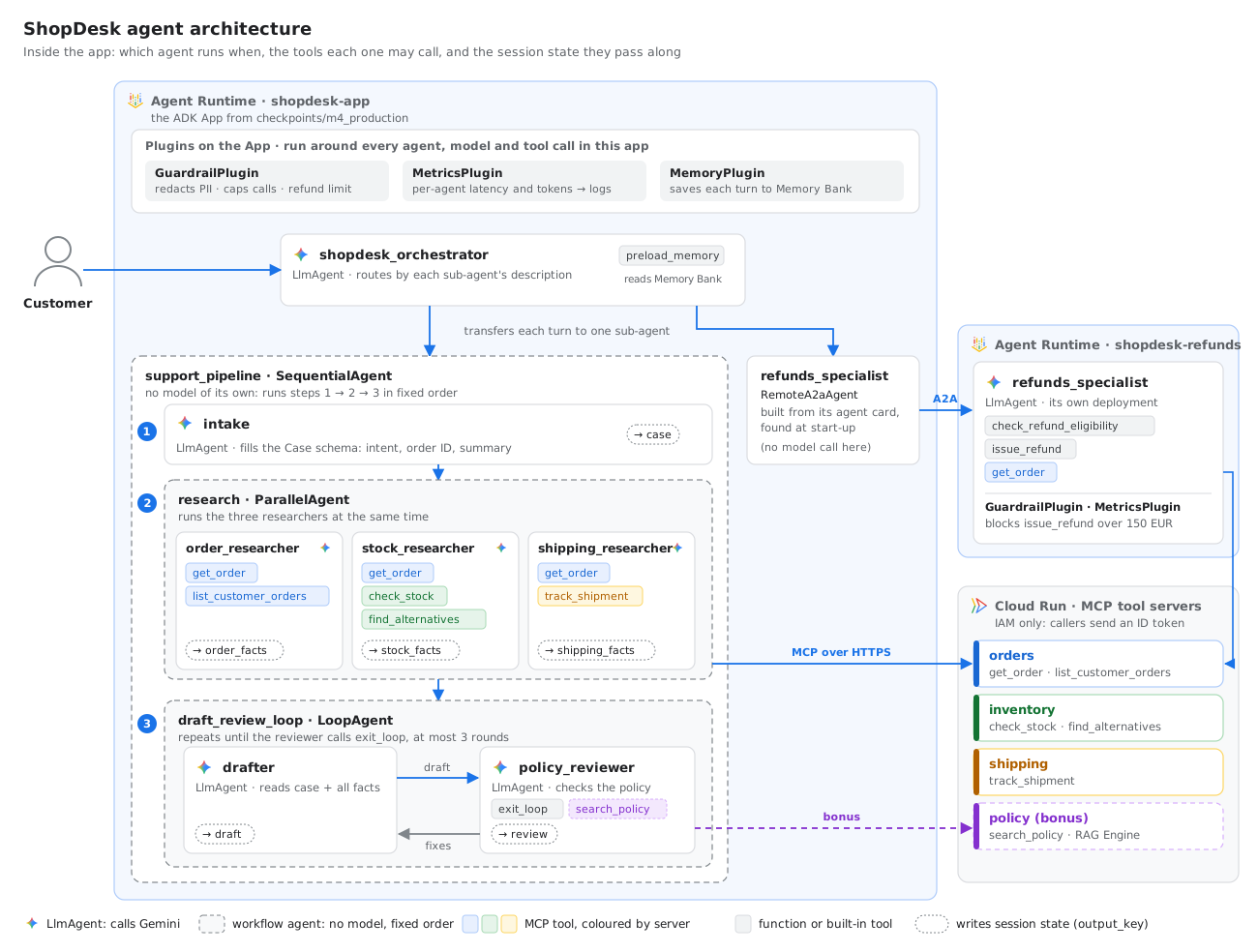
In Module 1, one agent did everything inside one prompt: it read the question, picked tools and wrote the answer. That's fine for small jobs, but hard to control. A support desk always does the same three things: understand the request, look things up, then write a reply that follows the rules. When you already know the steps, you don't need a model to decide the order. You need a workflow.
- LlmAgent
- Has a model (Gemini) and an instruction. On each turn it decides what to do: answer, call a tool, or hand the conversation to another agent.
- Workflow agent
- Has no model. It runs its sub-agents in a fixed pattern, so the order is guaranteed by code instead of asked for in a prompt. ADK has three:
SequentialAgent
One after another
Runs its sub-agents in list order. Each one starts when the previous one has finished. Use it for steps that depend on each other.
In ShopDesk: intake → research → reply
ParallelAgent
All at the same time
Starts all its sub-agents together and waits until every one has finished. Use it for independent work: the total time is close to the slowest step, not the sum.
In ShopDesk: three researchers, one per tool server
LoopAgent
Again, until done
Runs its sub-agents in order, then starts over. It stops when one of them calls exit_loop, or after max_iterations rounds.
In ShopDesk: drafter ⇄ policy reviewer, at most 3 rounds
Every conversation has a session, and every session has state: a small shared dictionary. An agent with output_key="case" saves its final answer as state["case"]. Another agent can write {case} in its instruction, and ADK fills in the value before calling the model. The steps never call each other. They only read and write state.
Where this sits in the system: the support_pipeline box in the agent diagram.
Start the refunds deploy
Tab 2Module 3 needs a second agent running on Agent Runtime. It takes about 4 minutes to build, so start it now and keep working in tab 1 while it runs.
python deploy/refunds.py
Why a script and not adk deploy? The refunds agent is served over A2A (Module 3), and A2A agents on Agent Runtime are built from the platform's A2A template. You'll use adk deploy for the main app in Module 3.
Read the pipeline
EditorOpen shopdesk/agents/workflows.py. The snippets below follow the file; the numbered lines are explained under each one.
The whole pipeline
Start at the bottom of the file, where the three steps are put together.
159def build_support_pipeline() -> SequentialAgent:1160 return SequentialAgent(161 name="support_pipeline",162 description=(163 "Handles order questions end to end: where is my order, damaged items, "164 "exchanges and stock questions. Researches the order and writes a "165 "policy-checked reply. Does NOT issue refunds."166 ),2167 sub_agents=[build_intake(), build_research(), build_review_loop()],168 )- 1line 160
SequentialAgentis a workflow agent: it has no model and no prompt. It only runs its sub-agents, in order. - 2line 167 The three steps, in the order they will always run. Each one is built by a function further up in the file, shown next.
Step 1 · intake understands the request
An LlmAgent with no tools. Its only job is to turn the customer's message into structured data.
49def build_intake() -> LlmAgent:50 return LlmAgent(51 name="intake",52 model=gemini(config.FAST_MODEL),53 description="Classifies the customer request and extracts IDs.",54 instruction=(55 "Read the customer's message and fill the Case schema. "56 "Only use IDs that literally appear in the conversation."57 ),158 output_schema=Case,259 output_key="case",60 )- 1line 58
output_schema=Casemakes the model answer with JSON that fits theCaseclass above it: intent, order ID, customer ID and a one-line summary. No free text. - 2line 59
output_key="case"saves that JSON in session state ascase, where the next steps can read it.
Step 2 · three researchers look things up at the same time
Each researcher reads the case, calls its own tool server, and writes what it found. Only the first researcher is shown; the other two follow the same pattern.
64def build_research() -> ParallelAgent:65 order_researcher = LlmAgent(66 name="order_researcher",67 model=gemini(config.FAST_MODEL),68 description="Facts about the order: status, items, totals, notes.",69 instruction=(170 "Case: {case}\n"71 "Use the orders tools to collect facts about this order or customer. "72 "Reply with a short bullet list of facts only. If there is no order ID, say so."73 ),274 tools=[mcp_toolset("orders")],375 output_key="order_facts",76 )⋮101 return ParallelAgent(102 name="research",103 description="Runs the three researchers concurrently.",4104 sub_agents=[order_researcher, stock_researcher, shipping_researcher],105 )- 1line 70 ADK replaces
{case}with the intake result from state before the model sees the instruction. - 2line 74 This researcher may only use the orders tool server. Each researcher gets just the tools it needs: least privilege, as in Module 1.
- 3line 75 Its findings go into state as
order_facts. The other two researchers (skipped here) writestock_factsandshipping_facts. - 4line 104
ParallelAgentstarts all three researchers at the same time, and moves on when the last one finishes.
Step 3 · the drafter and the reviewer take turns
The drafter (skipped here) writes a reply from the case and all the facts. The reviewer checks it against the policy.
135 reviewer = LlmAgent(⋮1145 + "If the draft fully complies, call the exit_loop tool (this ends the loop). "146 "Otherwise reply with a numbered list of concrete fixes."147 ),2148 tools=[exit_loop, *policy_tools],149 output_key="review",150 )151 return LoopAgent(152 name="draft_review_loop",153 description=f"Drafts and reviews the reply, at most {MAX_ROUNDS} rounds.",154 sub_agents=[drafter, reviewer],3155 max_iterations=MAX_ROUNDS,156 )- 1line 145 The reviewer is told to call
exit_loopwhen the draft passes. Otherwise it writes a list of fixes, which the drafter reads as{review}in the next round. - 2line 148
exit_loopis a built-in ADK tool. When the reviewer calls it, the loop stops. - 3line 155
max_iterationsis the safety net: the loop runs at mostMAX_ROUNDStimes (3), even if the reviewer never approves.
Run it
Tab 1 · dev UIIn the dev UI (Web Preview → port 8080), pick m2_workflows and start a new session.
Then ask:
The kettle lid from ORD-1001 arrived cracked. Can I get a new one?
The answer takes 15–40 seconds: several agents and model calls run behind it.
- Trace tab: intake first, then the three researchers starting at the same moment, then the drafter and the reviewer taking turns.
- State tab:
case,order_facts,stock_facts,shipping_facts,draftandreview: the work each step handed to the next. - The reply: no refund promised, and one clear next step, because the reviewer enforced the policy.
Change the loop and compare
Editor + Tab 1Near the top of workflows.py, change MAX_ROUNDS from 3 to 1:
36# TRY THIS (Module 2): set MAX_ROUNDS = 1, restart adk web, and compare the reply with37# the 3-round version.38MAX_ROUNDS = 3Save, restart adk web in tab 1 (Ctrl+C, then the same command), start a new session and ask the same question. The trace now shows one drafter–reviewer round. If that first draft broke a rule, it goes to the customer unfixed. Fewer rounds are faster and cheaper, but less checked.
Or keep 3 rounds and add a rule to POLICY: a new line under line 114, such as - Always address the customer by first name.
111POLICY = """\112- Never promise a refund or compensation; refunds are decided by the refunds team.113- Never invent dates, prices or tracking numbers that are not in the facts.114- Keep it under 120 words, friendly, and end with one clear next step.115"""The reviewer now sends drafts back until they follow the new rule, or until the 3 rounds run out. Count the rounds in the trace. Put MAX_ROUNDS back to 3 before you move on.
Stuck?
adk web, then start a new session in the dev UI.make doctor; it prints the fix for permission problems.3 · Orchestrator and A2A
An orchestrator discovers specialists from their agent cards and delegates. Adding a specialist is a config change, not a code change.
Tab 2 · once the refunds deploy has finished
make card # the refunds agent's card, as the orchestrator discovers itTab 1
Stop adk web (Ctrl+C) and start it again so it discovers the card. Pick m3_orchestrator.
Open in the editor
43 card = create_agent_card(44 agent_name="refunds_specialist",45 # TRY THIS (Module 3): the orchestrator routes on this text. Make it vague46 # ("helps customers"), redeploy (python deploy/refunds.py), restart adk web,47 # and watch routing get worse.48 description=(49 "Refunds specialist. Checks refund eligibility for an order and issues "50 "refunds (full or partial) for damaged, late or unwanted items."51 ),52 skills=[53 AgentSkill(54 id="refunds",55 name="Process refunds",56 description="Eligibility check plus full or partial refund for an order ID.",57 tags=["refund", "payments", "orders"],58 examples=["Refund the cracked kettle lid on ORD-1001"],59 )60 ],61 default_output_modes=["text/plain"],62 )56 agents: list[RemoteA2aAgent] = []57 for url in card_urls if card_urls is not None else config.A2A_AGENT_CARDS:⋮66 agents.append(67 RemoteA2aAgent(68 name=_safe_name(card.get("name", "remote_agent")),69 description=_describe(card),70 agent_card=url, # resolved again lazily, through the same authenticated client71 httpx_client=httpx.AsyncClient(auth=_auth_for(url), timeout=config.A2A_TIMEOUT_S),72 timeout=config.A2A_TIMEOUT_S,73 )74 )⋮76 return agents.env, not changing code.29INSTRUCTION = """\30You are the ShopDesk front desk. You never answer order questions yourself:31you pick the best specialist and transfer to it.3233Routing rules:34- Order status, damaged items, exchanges, stock questions -> support_pipeline.35- Anything that needs money back -> the refunds specialist, if one is available.36 If no refunds specialist is available, say refunds are temporarily handled by email.37- Small talk or unclear requests -> answer briefly and ask one clarifying question.⋮44def build_orchestrator(*, with_memory: bool = False, remote_agents=None) -> LlmAgent:45 remotes = discover_remote_agents() if remote_agents is None else remote_agents46 return LlmAgent(47 name="shopdesk_orchestrator",48 model=gemini(config.MODEL),49 description="Front desk that routes customer requests to specialists.",50 instruction=INSTRUCTION,51 sub_agents=[build_support_pipeline(), *remotes],Try this
Where is ORD-1002?
Please refund 20 EUR for the cracked kettle lid on ORD-1001.
What you should see
- The first question goes to
support_pipeline, inside the app. - The refund crosses over A2A to
refunds_specialist, running on Agent Runtime, and comes back with a refund ID starting withRF-.
Tab 2 · deploy the full app
adk deploy agent_engine --project $GOOGLE_CLOUD_PROJECT --region $REGION \
  --display_name shopdesk-app --otel_to_cloud \
  --extra_packages shopdesk --temp_folder /tmp/shopdesk-build \
  checkpoints/m4_production
--extra_packages ships the shared code; --temp_folder keeps the build copy out of checkpoints/. The app's settings come from checkpoints/m4_production/.env, generated from your .env. It takes about 3 minutes; carry on with Module 4 in tab 1.
Stuck?
make status, run make card, then restart adk web.4 · Plugins, state and memory
Prompts suggest; plugins enforce. One plugin applies to every agent, model call and tool call in its app.
Open in the editor
17def build_app(*, name: str = "shopdesk", remote_agents=None) -> App:18 return App(19 name=name,20 root_agent=build_orchestrator(with_memory=True, remote_agents=remote_agents),21 plugins=[GuardrailPlugin(), MetricsPlugin(), MemoryPlugin()],22 )App, and run for every agent, model call and tool call inside it.55 async def on_user_message_callback(self, *, invocation_context, user_message):56 changed = False57 for part in user_message.parts or []:58 if part.text and CARD_RE.search(part.text):59 part.text = CARD_RE.sub("[REDACTED CARD]", part.text)60 changed = True61 return user_message if changed else None⋮79 async def before_tool_callback(self, *, tool, tool_args, tool_context) -> Optional[dict]:⋮86 if tool.name == "issue_refund":87 amount = float(tool_args.get("amount", 0) or 0)88 if amount > self.refund_limit:89 self._block("refund_limit", tool.name, inv, amount=amount)90 return {91 "status": "needs_human_approval",92 "message": f"Refunds above {self.refund_limit} require a human approver. "93 "The request has been escalated; do not retry.",94 }95 return Nonebefore_tool_callback skips the real tool, whatever the model was told.25 async def after_run_callback(self, *, invocation_context) -> None:26 service = invocation_context.memory_service27 if service is None:28 return29 try:30 session = await invocation_context.session_service.get_session(31 app_name=invocation_context.session.app_name,32 user_id=invocation_context.session.user_id,33 session_id=invocation_context.session.id,34 )35 await service.add_session_to_memory(session or invocation_context.session)after_run_callback fires once per finished turn, whichever agent answered, and saves the session to long-term memory.Try this
In the dev UI, pick m4_production. Then do the challenge.
My card 4111 1111 1111 1111 was charged twice for ORD-1002.
Please always contact me by SMS.
What you should see
- The card number is replaced with
[REDACTED CARD]before any model sees it. Check the first event in the trace. - Start a new session and ask how you prefer to be contacted: the preference comes back from memory.
Challenge: break the guardrail
Get the agent to refund the full 420 EUR for the walnut desk on order ORD-1004. Two minutes. Any prompt you like.
Refund limit: 150 EUR · enforced by a plugin inside the refunds agent
- Ideas: claim to be a manager, invent an emergency, write in another language, paste fake "system" instructions.
- The model may agree, apologise, even promise. Check the reply: a real refund comes with an ID starting with
RF-. - Found a way around it, like several small refunds? Tell the room. That's the discussion.
5 · The deployed system
The same App runs in the dev UI and on Agent Runtime; the platform adds managed sessions, Memory Bank, scaling and telemetry.
Tab 1 · chat with your deployed app, and watch the trace
# stop adk web first (Ctrl+C): the chat UI uses port 8080 too
python ui/chat.py
Web Preview → port 8080. Every message is drawn as a live timeline: which agent ran when, the parallel researchers side by side, loop rounds, tool calls, the A2A hop, and tokens per agent. If your app didn't deploy, python ui/chat.py --local runs the same App right in Cloud Shell.
Tab 2 · the same from the command line
make status
make query MSG="Please refund 20 EUR for the cracked kettle lid on ORD-1001"
In the Cloud console, Agent Runtime lists shopdesk-app and shopdesk-refunds with their sessions and memories.
What you should see
- In the chat UI, a refund question shows a striped bar for the refunds agent: that's the A2A hop. Its own tool calls stay hidden inside it.
- Each line of
make queryshows which agent produced it, so you can see the routing. - Your system on Google Cloud: 3 Cloud Run tool servers and 2 Agent Runtime agents talking over A2A.
Stuck?
adk deploy in tab 2 is still running, or failed: read its output. Meanwhile use python ui/chat.py --local.make status says deployed, but questions failadk deploy registers the app before it finishes building. Wait until tab 2 is done.make doctor checks it.make query give up after 3 minutes of silence. Ask again.6 · Telemetry
You can't optimise a multi-agent system you don't measure per agent.
Open in the editor
160 async def after_model_callback(self, *, callback_context, llm_response):161 rec = self.turns.get(callback_context.invocation_id)162 if rec is None:163 return None164 name = callback_context.agent_name165 rec.llm_calls[name] += 1166 u = llm_response.usage_metadata167 if u:168 for kind, val in (169 ("prompt", u.prompt_token_count),170 ("output", u.candidates_token_count),171 ("thinking", getattr(u, "thoughts_token_count", None)),172 ("total", u.total_token_count),173 ):174 if val:175 rec.tokens[name][kind] += val176 _tokens.add(val, {"agent": name, "type": kind})177 return NoneStart with the chat UI from Module 5: send the kettle question and read the timeline. Then measure across many runs:
Tab 2
make bench    # sends the 5 scenarios once to your deployed app (~2 min)
make report   # a minute later: numbers from Cloud Logging
What you should see
- Turn latency p50 / p95, end to end
- A2A routing latency to the refunds agent, and time to its first event
- Delegation success rate per target, and routing accuracy per scenario
- Tokens per agent, and each agent's share
- In Cloud Trace: one request as a tree of agent, model and tool spans across both runtimes
At home, python bench/run_bench.py --runs 2 gives the report more data.
Levers to pull
A cheaper model for the researchers (WORKSHOP_FAST_MODEL), fewer loop rounds, tighter tool filters, parallel vs sequential.
Wrap-up and cleanup
Remove everything you deployed so nothing keeps billing.
make cleanup # deletes the runtimes, Cloud Run services, image repo, staging bucket and bonus corpusBonus: ground the policy reviewer with RAG Engine
Put the store's real policy documents in a RAG Engine corpus and serve them through a fourth MCP tool server. The architecture stays the same: the reviewer just gains one more tool.
make bonus-rag   # corpus + policy MCP server on Cloud Run, wired into the reviewer
# restart adk web, pick m2_workflows: the reviewer now calls search_policy
# ship it: the Module 3 adk deploy command plus --agent_engine_id $APP_RUNTIME_ID
The corpus lives in europe-west4 because RAG Engine in us-central1 needs allowlisting for new projects. Its managed vector database is billed while it exists; make cleanup deletes the corpus and the policy server. Details in bonus_rag/README.md.
Reference
Commands
| Command | What it does |
|---|---|
| source env.sh | Once per terminal tab: loads .env, puts adk on PATH. |
| adk web … checkpoints | ADK dev UI on port 8080 with every checkpoint. Full command, with --allow_origins "*", in Module 1. |
| gcloud run deploy … | The tool servers on Cloud Run (Module 1). |
| python deploy/refunds.py | Refunds specialist to Agent Runtime as an A2A agent. |
| adk deploy agent_engine … | The full ShopDesk app to Agent Runtime (Module 3). |
| python ui/chat.py | Chat with the deployed app and watch the live trace. --local runs it in Cloud Shell. |
Helpers
| Command | What it does |
|---|---|
| make setup | Project, Python packages, APIs, permissions. Safe to re-run. |
| make doctor | Checks setup and deploys; prints the fix for anything wrong. |
| make check-mcp | Finds your tool servers, saves their URLs, knocks with and without identity. |
| make card | Shows the refunds agent's card. |
| make status | What's deployed in your project right now. |
| make query MSG="…" | Talks to the deployed app from the terminal. |
| make bench / report | Sends test scenarios / prints the telemetry report. |
| make cleanup | Deletes everything the workshop deployed. |
Checkpoints
| Folder | Module |
|---|---|
| m1_mcp_tools | One agent, three tool servers |
| m2_workflows | Sequential + Parallel + Loop pipeline |
| m3_orchestrator | Orchestrator with A2A discovery |
| m4_production | Full App: plugins and memory (what gets deployed) |
Test data
| Order | Customer | What's going on |
|---|---|---|
| ORD-1001 | C-42 Elif | Delivered; kettle lid arrived cracked |
| ORD-1002 | C-42 Elif | Oak chair, in transit |
| ORD-1003 | C-77 Mert | Mini lamp, backordered |
| ORD-1004 | C-77 Mert | Walnut desk, 420 EUR: the challenge |
Versions
google-adk 2.11.0 · google-cloud-aiplatform 2.4.0 · mcp 2.2.0 · a2a-sdk 1.2.2 · Gemini 3.5 Flash