Workshop · Google Cloud Day Türkiye, Builder Connect · Tue 27 Oct 2026 · Omar Elcircevi
Deploying your agents on Google Cloud Agent Platform
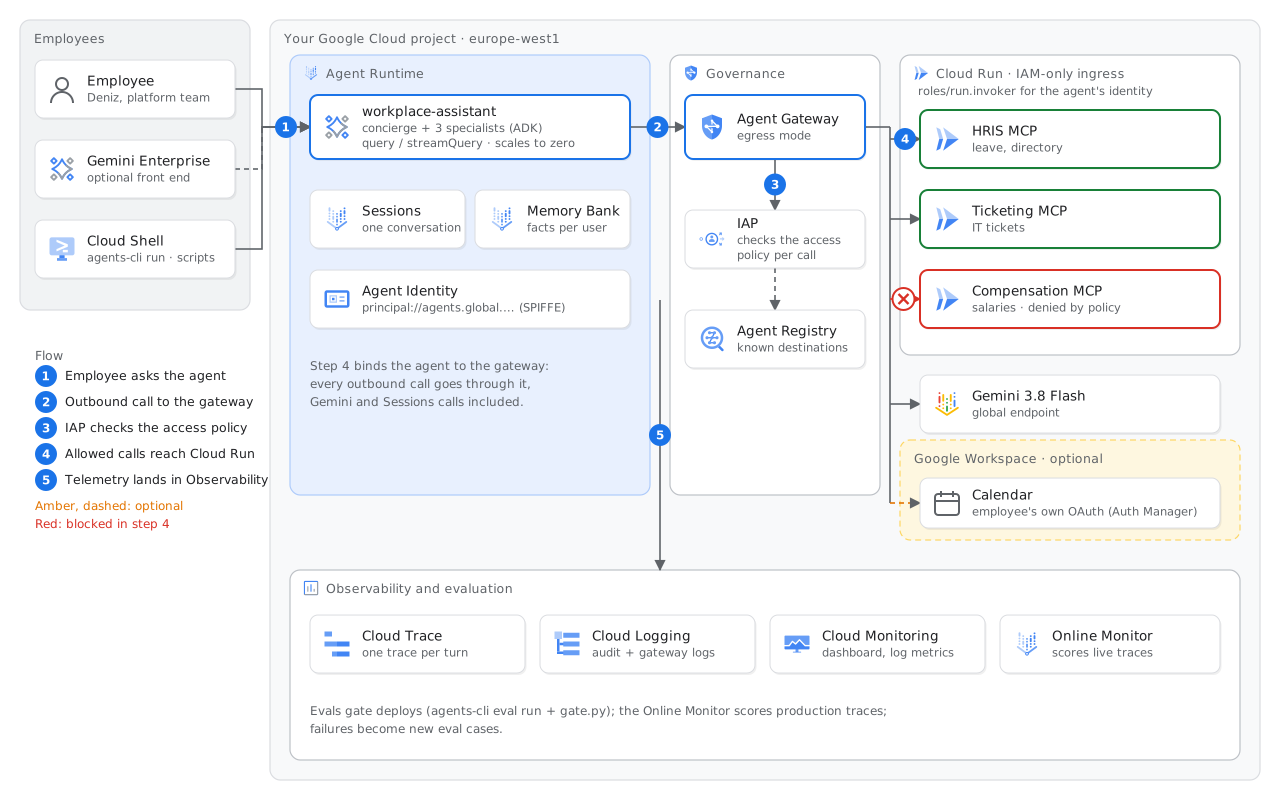
In about 40 minutes, you move a multi-agent HR and IT assistant from a repo to a production setup. The agent runs on Agent Runtime with its own Agent Identity and uses Memory Bank. Agent Gateway checks each tool call, each turn makes a trace, and an eval gate controls each deploy.
What you build
Workplace Assistant is one entry point for HR and IT questions at Kuzey Labs, a fictional company. All the employees, salaries, tickets and handbook pages are fictional.
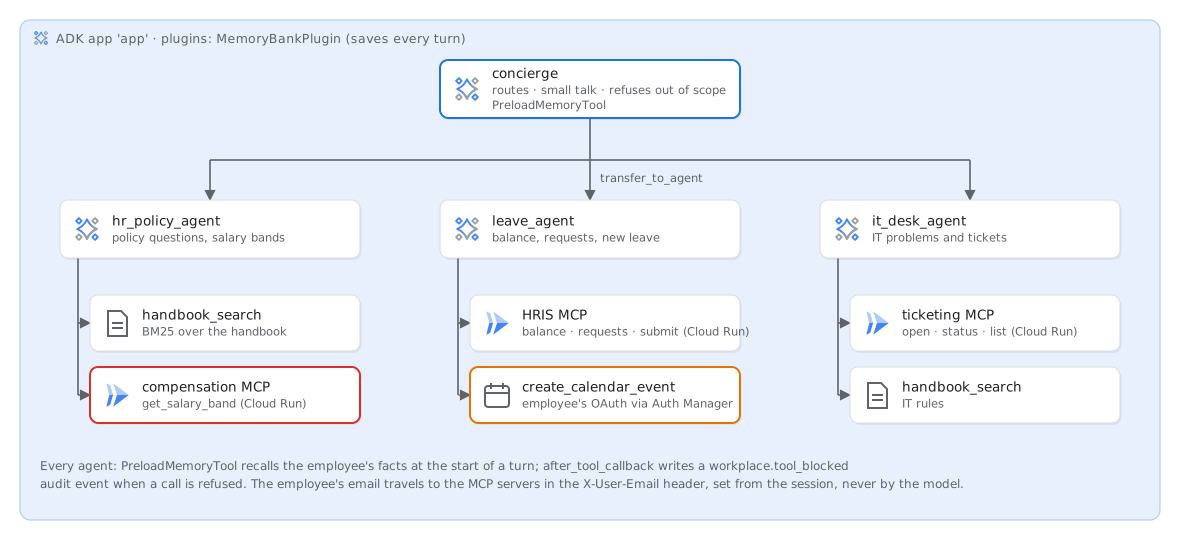
- concierge sends each request to the correct specialist agent. It answers greetings and general questions, and it refuses all requests outside HR and IT.
- hr_policy_agent answers questions with text from the handbook (in-process BM25 search in six Markdown files). It also finds the published salary bands.
- leave_agent reads leave balances and books leave in the HRIS, which is an MCP server. It can also add the leave to the Google Calendar of the employee.
- it_desk_agent opens tickets in the ticketing MCP server and gives their status.
- A third MCP server, compensation, contains individual salaries. The code of the agent can call it. In step 4, a policy stops these calls.
Before you start
- A Google Cloud project with billing enabled. You must have the Owner role, because the lab grants IAM roles and binds an access policy. A new project is the easiest option.
- A browser. All the commands run in Cloud Shell, which already has
gcloud,uv,gitand Python. - agents-cli 1.11 or later:
uv tool install --force "google-agents-cli>=1.11". Step 1 installs it, because the agents-cli in Cloud Shell is an older version. - The europe-west1 region. All the products in the lab are available there. The model runs on the
globalendpoint, and step 2 tells you why. - Cost: about USD 1 for each participant, mostly for Gemini tokens. Run the teardown at the end.
The six steps
Each step has the same parts. It starts with how it works (one diagram), the commands to paste and the output that you get. It ends with a check (./scripts/check.sh N), if this fails, and a box with the title Take this to a customer.
- STEP 1 · 5 MINSet upAPIs, three MCP servers on Cloud Run, Agent Registry, and the start of Agent Gateway in the background.
- STEP 2 · 8 MINDeploy
agents-cli deployto Agent Runtime with Agent Identity. Then ask the agent questions. - STEP 3 · 6 MINRememberTell the agent your team one time. Memory Bank recalls it in a new session.
- STEP 4 · 8 MINSecureBind Agent Gateway. A policy refuses a salary request, and the HRIS continues to work.
- STEP 5 · 5 MINObserveSee one leave request as a trace, and a dashboard that shows blocked calls.
- STEP 6 · 7 MINEvaluateThe eval gate, scores for live traffic, the managed Online Monitor, and a production failure that becomes a test.
Agenda (60-minute session)
- 0:00Intro: what we build, the architecture, the six steps (slides)
- 0:08Steps 1–2: set up and deploydeploy: ~5 min
- 0:21Step 3: Memory Bank
- 0:27Step 4: Agent Identity and Agent Gatewayredeploy: ~4 min
- 0:35Steps 5–6: traces, evals, Online Monitors
- 0:47Runtime choice, production checklist, Q&A, teardown
How the lab works
Checkpoint branches. The branches step-0-start … step-6-evaluate contain the repo as it is after each step. If you join late or your copy does not work, change to the branch of the last step that you completed. Then continue. ./scripts/check.sh without an argument checks the step of that branch.
git fetch origin
git checkout step-3-remember   # state after step 3
./scripts/check.sh             # checks step 3
The branches change only files. They do not change your cloud resources. If you did not do an earlier step in your project, run its commands first. You can safely run each script again.
Use one terminal tab for the full lab. Later steps use variables that you set in earlier steps. A deploy takes approximately 5 minutes. Read the guide while it runs.