Part 1 · Setup and Data
Goal: Set up the environment, download daily THYAO.IS prices without getting stuck on rate limits, and visualise the OHLCV structure.
Key ideas:
- What is OHLCV? Each trading day is summarised by five numbers: Open, High, Low, Close and Volume.
- Adjusted prices (
auto_adjust=True): Dividends and stock splits create artificial drops in the raw price. Withauto_adjust=True,yfinancereturns all historical OHLC prices adjusted for splits and dividends. - A fallback that always works: When 40 people in one room hit Yahoo Finance at once, a rate limit (
YFRateLimitError) is likely. On an error or an empty table,load_pricesautomatically loads snapshot data instead.
Catch-up cell: 🔄 Catch up: Part 1 (run this if your runtime was reset)
Step-by-step code walkthrough:
After running the ⚙️ Setup cell, we load THYAO.IS by calling load_prices in TODO 1 (sec1-load-code):
TICKER = "THYAO.IS"
# TODO 1 solution:
raw_df = load_prices(TICKER, start="2015-01-01", end="2026-11-17")
print(f"Data shape: {raw_df.shape} | Date range: {raw_df.index.min().date()} -> {raw_df.index.max().date()}")
display(raw_df.tail(5))Then we plot the close price and the volume one above the other with plot_ohlcv:
fig = plot_ohlcv(raw_df, ticker=TICKER)
plt.show()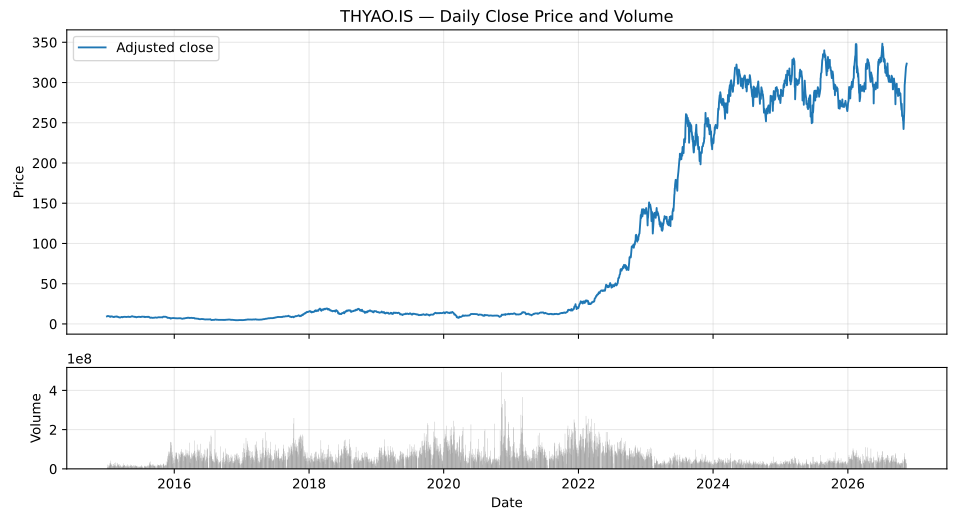
(3023, 5) (2015-01-01 -> 2026-11-16) and a close-price chart that climbs from single-digit lira in 2015–2016 to over 300 TL in 2026.Troubleshooting (if this step fails):
- Yahoo Finance rate limit (
YFRateLimitErroror an empty table): Nothing to do.load_pricesprints⚠️ Could not get THYAO.IS from Yahoo Finance (...). Loading the snapshot data...and loads the local or online snapshot. NameError: name 'load_prices' is not defined: Your Colab runtime has probably restarted. Run the🔄 Catch up: Part 1cell at the top of Part 1.