Agent Runtime, Cloud Run or GKE
Start on Agent Runtime. If you need more control than the managed runtime gives, move to Cloud Run or GKE.
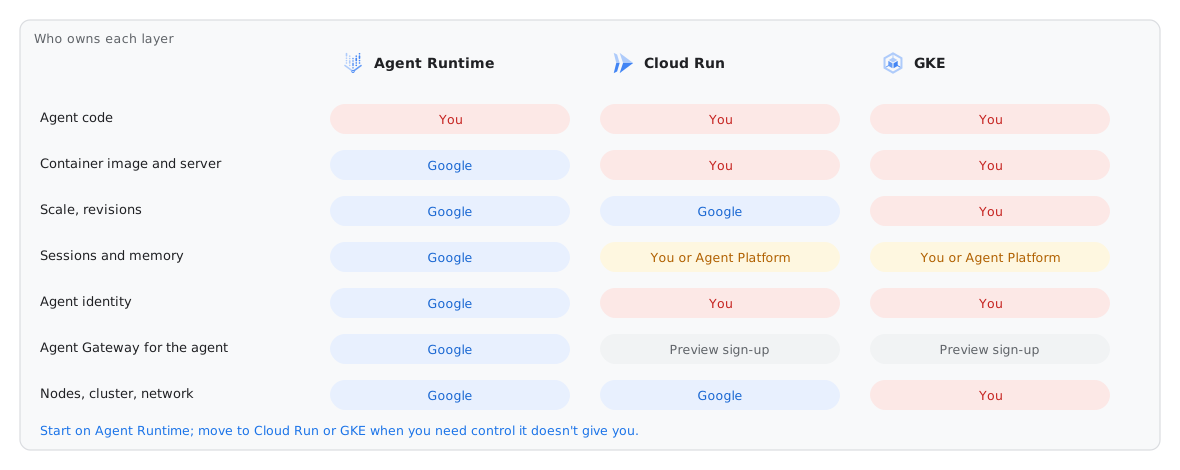
| Agent Runtime | Cloud Run | GKE | |
|---|---|---|---|
| What you run | Your agent code. Google builds and runs the container. | A container that you own, one service for each agent. | Containers on a cluster that you own. |
| Where sessions are | Included (Agent Platform Sessions). | You choose: in memory, Cloud SQL or Agent Platform Sessions. | You choose: the same options as Cloud Run. |
| Long-term memory | Memory Bank, included. | Memory Bank through an Agent Runtime instance, or your own store. | The same as Cloud Run. |
| Agent identity | One Agent Identity for each agent. | A service account. Agent Identity is in Preview. | Workload Identity. |
| Agent Gateway, monitors | One flag binds the agent to a gateway. Agent Runtime includes Online Monitors and the console playground. | Gateway for Cloud Run agents: Preview, by sign-up. | Gateway for GKE agents: Preview, by sign-up. |
| Scale and cost | Scales to zero. You pay for vCPU-hours and GiB-hours while it processes requests. | Scales to zero. You control CPU, concurrency and the minimum number of instances. | You pay for your node pools, also when they are idle. |
| Use it when | You want the platform to operate the agent. This is the default. | You need a custom server, sidecars, WebSockets or control of VPC egress. | You already use GKE, or you need GPUs, a service mesh or other clouds. |
Same code, other targets
agents-cli adds the other targets to a project that you already have. The alt/cloud-run branch of the repo contains the agent of this lab after these commands:
agents-cli scaffold enhance . --deployment-target cloud_run
agents-cli deploy                 # runs gcloud run deploy with the generated settings
For GKE, --deployment-target gke adds Kubernetes manifests and Terraform for a cluster. Then agents-cli deploy builds the image, applies Terraform and runs kubectl apply. Keep sessions and memory in Agent Platform, so that the pods keep no state. Use Workload Identity for the pods.
The MCP servers of this lab already run on Cloud Run. Tools that other teams own usually go there too, next to the agent runtime and not in it.
Departments as separate agents (A2A)
The lab deploys one app with four agents. If each department owns its agent, deploy each agent to its own Agent Runtime instance. Then let the concierge find the agents. The alt/multi-agent-a2a branch of the repo is a tested proof of concept (refer to docs/A2A.md in that branch):
- Discovery. Each Agent Runtime deployment adds itself to Agent Registry. When the concierge starts, it reads the list of agents in the registry. It gets the A2A card of each agent and adds the agent as a
RemoteA2aAgent. You do not configure a URL. - Identity. The concierge calls the department agent with its own Agent Identity. It sends the employee in the metadata of the A2A request. The department agent acts for that employee, and its MCP server records the correct person.
- Observability. Each agent has its own traces. Because of this, the managed Online Monitor no longer skips turns that have more than one agent.
- Limits. Agent Gateway accepts the calls and records them. But it identifies them as calls to the Google APIs endpoint, so a policy rule for each agent does not apply yet. Each turn has a second network hop: 7–12 s when the agents are warm, about 50 s when both agents are cold.