Step 2 · Deploy
In this step, you deploy the agent to Agent Runtime with its own Agent Identity. Then you let that identity call the MCP servers, and you ask the agent questions.
checkpoint branch step-2-deploy
How it works
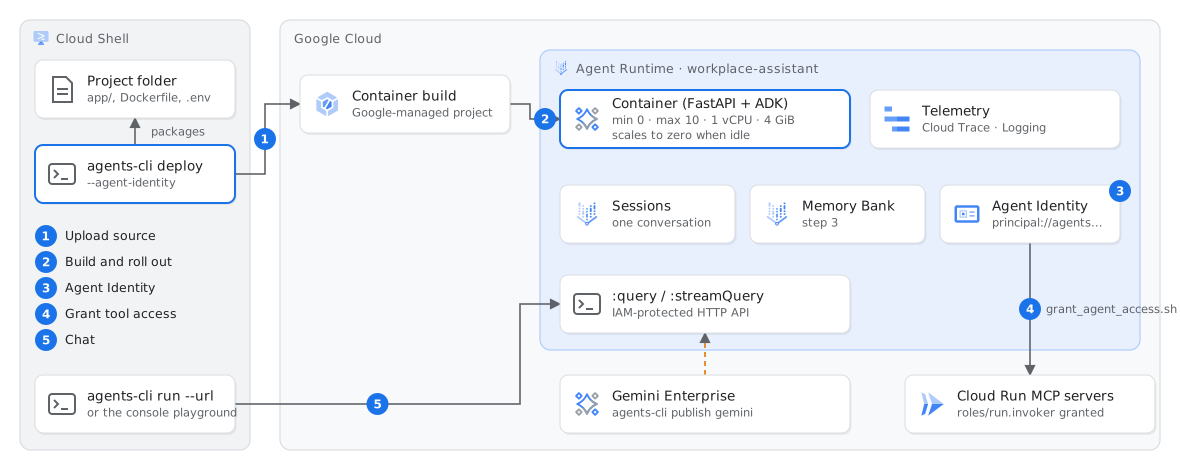
agents-cli deploy changes a folder into a managed, autoscaled agent. Your code never runs on a VM that you manage.What the package contains. agents-cli deploy uploads the project and its Dockerfile, without the files that .gcloudignore excludes. Agent Runtime builds the image in a Google-managed project. Thus, the build is not in your Cloud Build history. The values in .env become environment variables of the deployed agent. For this reason, do not put secrets in .env.
What Agent Runtime gives you. You get a container that scales to zero, behind two IAM-protected methods, :query and :streamQuery. The defaults are min 0 and max 10 instances, 1 vCPU and 4 GiB. The platform stores the sessions. Traces and logs go to Cloud Trace and Cloud Logging. The console has a playground for each deployment.
Agent Identity. With --agent-identity, the agent gets its own principal, principal://agents.global.…/reasoningEngines/ID. A SPIFFE certificate supports this principal. You grant roles to the agent, not to a shared service account. When you delete the agent, its access stops.
Why the model runs on global. Agent Runtime is in europe-west1, but Google serves Gemini 3.x Flash from the global and eu endpoints. With Agent Identity, the SDK calls Google APIs on their mTLS hostnames. The eu endpoint does not have an mTLS hostname, so the agent uses global.
Gemini Enterprise. agents-cli publish gemini registers the deployed agent in a Gemini Enterprise app. There, employees use the agent together with their other agents. This step needs a Gemini Enterprise app, and it is optional in this lab.
Run
Deploy the agent (approximately 5 minutes). Read the section above while the deploy runs.
source .workshop.env
agents-cli deploy --project $PROJECT_ID --agent-identity --no-confirm-project
Then give the agent identity access to the MCP servers. This script also sets the Memory Bank topics for step 3:
./scripts/grant_agent_access.sh
Ask the agent questions. IAM grants need one or two minutes to apply. If an answer says that the HRIS or the compensation system is not available, ask again.
AGENT_URL=$(./scripts/agent_url.sh)
agents-cli run --url "$AGENT_URL" --mode adk "What can you help me with?"
agents-cli run --url "$AGENT_URL" --mode adk "How many unused leave days can I carry over?"
agents-cli run --url "$AGENT_URL" --mode adk "What is the salary band for an L5 in Istanbul?"
Remember the last answer: the agent read the compensation system. In step 4, a policy stops these calls, and you do not change the code.
Optional: open the console playground. Go to Agent Platform → Agents → Deployments → workplace-assistant → Playground.
Expected result
agents-cli run --url always sends the user id cli-user. The demo changes this id to the fictional employee Deniz Kaya (platform team, Istanbul). Gemini Enterprise sends the user who signed in.
Check
./scripts/check.sh 2
If this fails
confirmation required … --project--project and --no-confirm-project, as in the command above.setIamPolicyresourcemanager.projects.setIamPolicy, which the Owner role includes. If you do not have this permission, deploy with --no-agent-identity. Then, in step 4, use the fallback instead of Agent Gateway.run.invoker grants need one or two minutes to apply. Ask again. Until then, the Cloud Run log shows The IAM principal lacks run.routes.invoke.No deployed agent from the scriptsdeployment_metadata.json there.