Step 5 · Observe
Follow one leave request in Cloud Trace, from the concierge to the HRIS. Open a dashboard that shows the blocked calls.
checkpoint branch step-5-observe
How it works
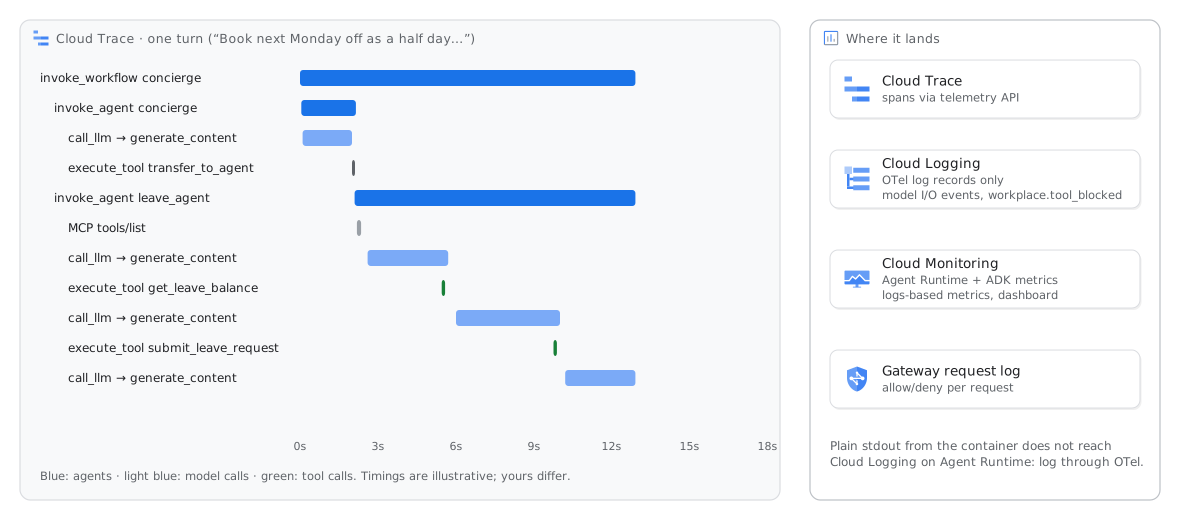
You get traces without extra code. agents-cli deploy sets GOOGLE_CLOUD_AGENT_ENGINE_ENABLE_TELEMETRY=true, and ADK sends OpenTelemetry spans to Cloud Trace. There is an invoke_workflow span for the turn and an invoke_agent span for each agent. There is a call_llm/generate_content span for each model call and an execute_tool span for each tool call. A failed tool call has the attribute error.type.
On Agent Runtime, logs need OpenTelemetry. Output from print() and from Python logging in the container does not get to Cloud Logging. OpenTelemetry log records get to Cloud Logging. The agent writes its audit event (workplace.tool_blocked) as an OpenTelemetry log record, and it also sends Python warnings this way. Setup also enabled prompt and answer events (EVENT_ONLY) and the instructions of the agent on the call_llm spans (ADK_CAPTURE_MESSAGE_CONTENT_IN_SPANS=true; agents-cli disables it by default). The Online Monitor of step 6 reads the two.
Metrics: Agent Runtime publishes the request count and the latency. ADK publishes the durations of tools and agents. Two logs-based metrics count the blocked calls, from the audit event of the agent and from the log of the gateway.
Run
If you did not book leave in step 3, make one leave request. Wait one minute for the trace. Then run the script:
agents-cli run --url "$AGENT_URL" --mode adk "Book next Monday off as a half day and tell me how many leave days I have left."
./scripts/observe.sh       # creates the dashboard, prints the newest leave-request trace
Open the two links that the script shows: the trace in Trace Explorer and the Workplace Assistant (workshop) dashboard. The console also shows the traces of each session in Deployments → workplace-assistant → Traces.
Expected result
Read the trace as a profile. The tool calls take milliseconds, and the model calls take seconds. Thus, most of the latency and cost comes from the model calls. The dashboard has five tiles: requests per minute, turn latency (p50 and p95), tool error rate, blocked calls and gateway denials. It shows the tool error rate for each tool and the blocked calls for each reason.
Check
./scripts/check.sh 5
If this fails
No trace matching …workplace.tool_blocked entries