Step 3 · Remember
In this step, you tell the agent about yourself one time. Then the agent uses this information in later conversations, and it does not ask again.
checkpoint branch step-3-remember
How it works
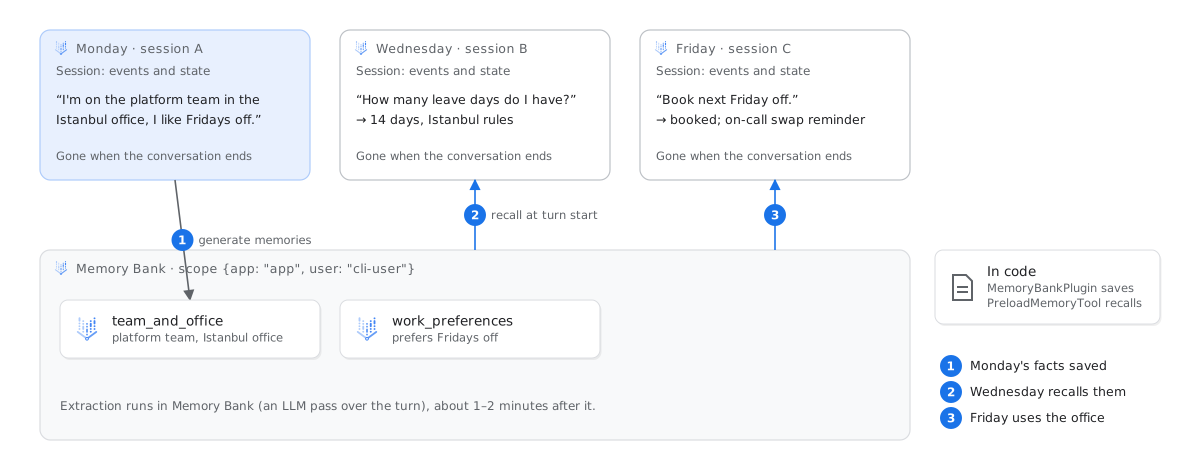
Sessions contain the events and state of one conversation. Agent Runtime stores them for you, and the agent uses VertexAiSessionService. A new session starts empty.
Memory Bank contains facts about a user, for each app and user id. After each turn, a plugin sends the turn to Memory Bank. Memory Bank uses an LLM to extract facts on the topics that you allow. Then it merges these facts with the facts that it has. At the start of the next turn, PreloadMemoryTool searches the facts with the new message. It adds the matches to the instructions of the model.
1class MemoryBankPlugin(BasePlugin):2 async def after_run_callback(self, *, invocation_context):3 events = [e for e in session.events if e.invocation_id == invocation_context.invocation_id]4 await memory.add_events_to_memory(..., events=events,5 custom_metadata={"wait_for_completion": False})You choose the facts that Memory Bank keeps. infra/memory/memory-bank.json limits the extraction to two topics, team_and_office and work_preferences, and to explicit instructions. In step 2, grant_agent_access.sh applied this file.
Run
Monday (session A). Each agents-cli run starts a new session.
agents-cli run --url "$AGENT_URL" --mode adk \
  "Hi! I'm on the platform team in the Istanbul office, and I prefer to take Fridays off."
Memory Bank extracts facts in the background, usually in one to two minutes. See the facts that it stored:
uv run python scripts/memory_bank.py list
Wednesday and Friday (new sessions; you do not give the context again):
agents-cli run --url "$AGENT_URL" --mode adk "How many leave days do I have?"
agents-cli run --url "$AGENT_URL" --mode adk "Book next Friday off."
Optional: in the console, open Deployments → workplace-assistant → Sessions and Memories. These tabs show the two stores.
Expected result
The on-call reminder comes from the memory. The Friday session did not say that you are on the platform team.
Check
./scripts/check.sh 3
If this fails
No memories yet for user 'cli-user'agents-cli run always uses cli-user. With scripts/ask.py --user you@example.com, you can choose the user. Then use the same user with memory_bank.py list --user.uv run python scripts/memory_bank.py clear deletes the memories of cli-user.