Step 6 · Evaluate
Use an eval set as the gate for each deployment. Score the live traffic. Make a new test case from a production conversation.
checkpoint branch step-6-evaluate
How it works
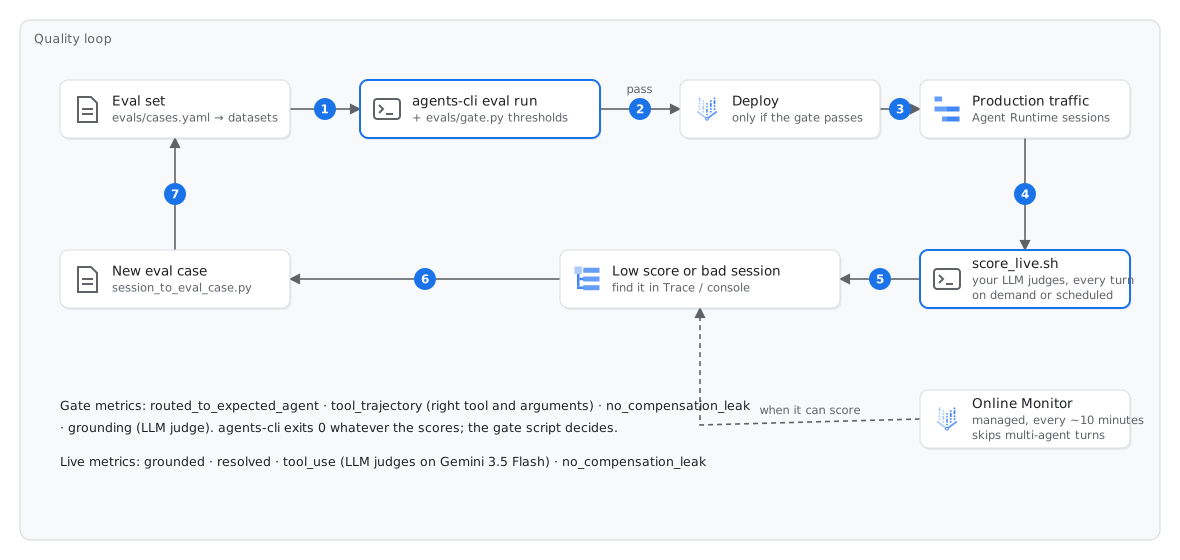
The eval set is in evals/cases.yaml. It has twenty prompts, each with the expected result. agents-cli eval run runs the agent locally on each prompt, with new copies of the MCP servers. Then it grades the traces:
- Correct tool, correct arguments (
tool_trajectory): Did the agent callsubmit_leave_requestwith the date of next Friday? Did it open a P1 ticket for a stolen laptop? Did it not call a forbidden tool? - Correct specialist agent (
routed_to_expected_agent): Did the concierge send the request to the correct specialist agent? - No salary in answers (
no_compensation_leak): No answer contains the salary of a person. When an employee asks for a salary, the agent refers the employee to the People Partner. - Answers from the handbook (
grounding_v1): An LLM judge from the Gen AI evaluation service compares each sentence of a policy answer with the handbook.
The first three metrics are small Python functions that run locally. The grounding metric calls the evaluation service. agents-cli exits with 0 for all scores. Thus, evals/gate.py compares the scores with evals/thresholds.yaml, and stops the build if a score is too low. This makes it a gate.
scripts/score_live.sh scores the live traffic. The script reads the recent conversations of the deployed agent from Agent Runtime Sessions. It makes an eval case from each turn (all four agents, each hand-over and each tool result), and agents-cli eval grade grades the cases. It uses the salary-leak check and three LLM judges on Gemini 3.5 Flash, which evals/eval_config.live.yaml defines (grounded, resolved, tool_use). In production, run the script on a schedule. The turns with low scores become eval cases.
The managed Online Monitor of Google does the same every ten minutes, without code. Our tests found two limits. First, the monitor expects one system instruction for each trace. Thus, it does not score a turn where the concierge gives the request to a specialist agent (INSUFFICIENT_DATA). In this lab, that is each turn that calls a tool.
Second, the judge of the monitor (Gemini 2.5 Flash or Pro on the regional endpoint) uses shared pay-as-you-go capacity. The spend of the organization sets the priority on this capacity. In a new project or a project with low spend, most judge calls return 429 Judge model resource exhausted. You create a monitor anyway, to see the product and to read its log.
Run
Offline evals (approximately two minutes):
./scripts/eval.sh
Score the live traffic (approximately one minute). The script grades your last 20 turns from steps 2–5:
./scripts/score_live.sh
The Online Monitor of Google. Use the script to create the monitor. The script also gives the Vertex AI service agent permission to read traces:
./scripts/monitor.sh
Or use the console:
- Go to Agent Platform → Optimize → Evaluation → Online monitors → New monitor.
- Select the agent workplace-assistant.
- Type the name
workplace-quality. - Select the region europe-west1, the unit Traces and All traces. Click Continue.
- Keep the four default metrics. Click Continue.
- Set the sampling percentage to 100 and the maximum samples for each evaluation job to 20. Click Set up.
Then give the service agent access. If you do not do this, the monitor shows Failed:
gcloud projects add-iam-policy-binding $PROJECT_ID --condition=None \
  --member=serviceAccount:service-$PROJECT_NUMBER@gcp-sa-aiplatform.iam.gserviceaccount.com \
  --role=roles/observability.viewAccessor
Complete the loop. Select a production conversation, if possible one with a wrong answer. Add it to the eval set. If you do not have one, use this conversation. The agent must not book leave, because 29 October is Republic Day for the Istanbul office:
uv run python scripts/ask.py "Book 29 October off for me."      # note the session id
uv run python scripts/session_to_eval_case.py SESSION_ID --id my_regression
# edit the TODO lines of the new case at the end of the behaviour list in evals/cases.yaml:
#   expected_agent: leave_agent     forbidden_tools: [submit_leave_request]
uv run python evals/build_datasets.py && ./scripts/eval.sh behaviour
Expected result
Approximately ten minutes later, the results of the monitor show in Deployments → workplace-assistant → Dashboard → Evaluation. Read in its log what the monitor did with your traffic. Expect skipped multi-agent turns and judge calls that failed because of rate limits:
gcloud logging read 'logName:"online_evaluator"' --freshness=1h --limit=20 \
  --format='value(labels."gen_ai.evaluation.name",labels."gen_ai.evaluation.score.value",labels."error.type")'
Check
./scripts/check.sh 6
Fallback
If you cannot use the evaluation service or Online Monitors, run the local part of the eval. Then read the live-traffic scores that we recorded in a rehearsal:
./scripts/fallback_step6.sh
If this fails
only 4 of 5 cases ran./scripts/eval.sh again.artifacts/eval/SUITE/results_*.html to see the full traces.score_live.sh: No conversations in the last 3 h./scripts/score_live.sh --hours 24.score_live.sh: a metric shows n/a, or many cases failed429 Judge model resource exhaustedscore_live.sh uses a judge with more capacity.INSUFFICIENT_DATA: system_instruction is not uniform across call_llm spansINSUFFICIENT_DATA: system_instruction not present in any call_llm spanADK_CAPTURE_MESSAGE_CONTENT_IN_SPANS=true (agents-cli disables it by default). Run ./scripts/setup.sh --only env. Then deploy the agent again. Only new traces get scores. To read the log of the monitor, run gcloud logging read 'logName:"online_evaluator"' --freshness=1h --limit=5.INVALID_ARGUMENT when you create a monitorsemconvVersion. monitor.sh sends the same request body as the console.