Step 4 · Secure
Send all outbound calls of the agent through Agent Gateway. Use a policy to block the compensation system. The code of the agent does not change.
checkpoint branch step-4-secure
How it works
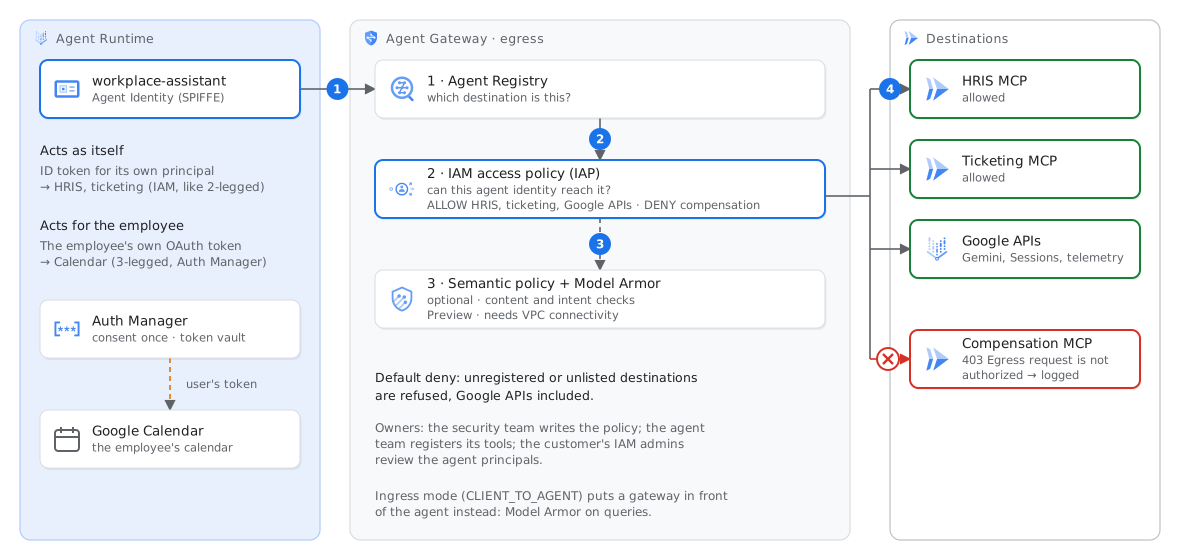
Two types of authority. When the agent calls the HRIS, it acts as itself with an ID token for its own Agent Identity, and Cloud Run checks roles/run.invoker. For external APIs, the same procedure is 2-legged OAuth (client credentials). When the agent adds leave to your calendar, it acts for you, and you must give your consent one time (3-legged OAuth). Agent Identity Auth Manager controls the consent procedure and keeps the tokens in storage that Google manages. When the tool runs, Auth Manager gives your token to ADK.
Agent Gateway checks each outbound call in this sequence:
- Agent Registry identifies the destination. The gateway refuses a destination that is not in the registry, unless a policy names that destination.
- IAM access policy. IAP examines the policy for the identity of the agent. The policy tells which agents can reach which MCP server, endpoint or tool. Its conditions can use tool names or annotations, for example
read_only_hint. A deny rule has priority over an allow rule. - Content checks (optional). A semantic governance policy (Preview) compares each tool call that the model proposes with a rule in plain language. An example rule is “never get the compensation of a person”. Model Armor examines MCP tool calls for prompt injection and sensitive data.
Default deny. After you bind the agent to the gateway, the gateway refuses all calls that the policy does not allow. This includes the calls of the agent to Gemini, Sessions, Memory Bank and telemetry. For this reason, setup.sh registered a google-apis endpoint, and the policy allows it.
Egress and ingress. This lab uses an egress gateway (Agent-to-Anywhere), which controls the calls that the agent makes. An ingress gateway (Client-to-Agent) is in front of the agent. It examines the query and streamQuery requests with Model Armor or a semantic policy. An ingress gateway must be in the same project and region as the agent. You can bind one agent to the two types of gateway.
Who owns the policy. The security team or the platform team writes the access policy. The agent team registers its tools and asks for access. The policy file in this repo is short:
1{2 "description": "No agent in this project may call the compensation system.",3 "effect": "DENY",4 "principals": ["principalSet://agents.global.proj-NUMBER…/aiplatform/projects/NUMBER"],5 "operation": {"permissions": ["iap.googleapis.com/resources.egressViaIAP"]},6 "conditions": {"iap.googleapis.com": {"expression":7 "destination.agent_registry.resource_type == 'MCP_SERVER' && destination.agent_registry.mcp_server.name == 'projects/PROJECT_ID/…/mcpServers/…'"}}8}secure.sh writes the names from Agent Registry into the rules.Run
Make sure that the gateway is ready. Setup started to build it in the background in step 1:
tail -1 .setup-gateway.log # should say GATEWAY READYApply the access policy. Then bind the agent to the gateway (a new deployment, approximately 4 minutes):
./scripts/secure.sh
agents-cli deploy --project $PROJECT_ID --update-only --agent-identity --no-confirm-project \
  --agent-gateway-egress=projects/$PROJECT_ID/locations/europe-west1/agentGateways/workplace-gw \
  --update-env-vars GOOGLE_API_ENABLE_RUNTIME_BOUND_TOKEN=false
The gateway examines the TLS traffic, thus the certificate-bound tokens of the agent cannot go through it without a change. The setting GOOGLE_API_ENABLE_RUNTIME_BOUND_TOKEN=false makes the agent use unbound tokens for Google APIs. The gateway documentation requires this setting.
Ask the same salary question as in step 2. Then make sure that the HRIS still works:
agents-cli run --url "$AGENT_URL" --mode adk "What is the salary band for an L5 in Istanbul?"
agents-cli run --url "$AGENT_URL" --mode adk "How many leave days do I have?"
Read the denial in the log of the agent and in the log of the gateway:
gcloud logging read 'labels."event.name"="workplace.tool_blocked"' --freshness=15m --limit=3 \
  --format='value(timestamp,jsonPayload.tool,jsonPayload.reason)'
gcloud logging read 'resource.type="networkservices.googleapis.com/Gateway" AND jsonPayload.authzPolicyInfo.result="DENIED"' \
  --freshness=15m --limit=3 --format='value(timestamp,httpRequest.requestUrl,jsonPayload.mcpInfo.method)'
Expected result
The code and the tools are the same as before. The answer changed because of a policy. The audit callback of the agent recorded gateway_denied, and the gateway recorded its own decision.
Check
./scripts/check.sh 4
No Agent Gateway in your project? Use the fallback
If .setup-gateway.log says GATEWAY FAILED, or if Agent Gateway is not available, block the compensation server with Cloud Run IAM. The code of the agent continues to call the server, but IAM refuses the call. The script shows the differences between this fallback and the gateway.
./scripts/fallback_step4.sh
agents-cli run --url "$AGENT_URL" --mode adk "What is the salary band for an L5 in Istanbul?"
./scripts/check.sh 4             # the log reason is permission_denied instead
IAM applies the removal of a grant in one to three minutes. If the agent still gives the salary band, wait one minute. Then ask again.
Optional: the employee's own Calendar (3-legged OAuth)
This is a demonstration for the instructor, because it needs an OAuth client and a consent screen. The procedure:
- Create an OAuth client (type Web application) in APIs & Services → Credentials. Enable the Google Calendar API.
- Create the Auth Manager provider:
gcloud agent-identity auth-providers create calendar-3lo --location=europe-west1 \
  --three-legged-oauth-client-id=CLIENT_ID --three-legged-oauth-client-secret=CLIENT_SECRET \
  --three-legged-oauth-authorization-url=https://accounts.google.com/o/oauth2/v2/auth \
  --three-legged-oauth-token-url=https://oauth2.googleapis.com/token
- Add the redirect URL of the provider (
…/authProviders/calendar-3lo/oauthcallbackonagentidentitycredentials.googleapis.com) to the OAuth client. - Give the agent permission to use the provider:
gcloud agent-identity auth-providers add-iam-policy-binding calendar-3lo --location=europe-west1 --role=roles/agentidentity.user --member="$AGENT_PRINCIPAL" - Set
CALENDAR_AUTH_PROVIDER=projects/$PROJECT_ID/locations/europe-west1/authProviders/calendar-3loin.env. Deploy the agent again. Nowleave_agenthas the toolcreate_calendar_event. At the first call, a client asks the employee for consent. This client must handle theadk_request_credentialevent of ADK. Then Auth Manager keeps the token.
If this fails
Reasoning Engine Execution failed)DENIED for …aiplatform.mtls.googleapis.com.401--update-env-vars GOOGLE_API_ENABLE_RUNTIME_BOUND_TOKEN=false.DENIED for all calls, minutes after you apply the policysecure.sh does this). The names in the conditions must use the project ID, as gcloud agent-registry … list shows them. The gateway log shows numbers, which can cause confusion.498 errorsjsonPayload.enforcedGatewaySecurityPolicy.hostname). Add it to infra/gateway/platform-endpoints.txt. Then run ./scripts/setup.sh --only registry../scripts/fallback_step4.sh --undo. For the gateway, remove the deny rule. Then run ./scripts/secure.sh again.